Showing posts with label Digital Distribution. Show all posts

Friday, October 19, 2012

Digital Distribution : Lost in Paradise. Play Store (Android)

Most people with a cell phone own a Smart phone. Most people with a smartphone own an Android phone. This is mainly because of the huge number of phones with the Android OS.

What is interesting is that Android phones, like computers, let you install apps from any sources. This makes them open to digital distribution platforms of all kind from well known distributors such as Amazon, to underground markets such as Aptoide.

In this article, we will focus on Google's own market now called the Play Store (before it was simply called Android Market), but you'll see that I bring the Pros and Cons of multiple markets.


Pros:

Open for business!
The fastest growing market has reached over 600,000 unique apps (NOT counting Tablets vs Phone apps and Lite Vs Paying apps as multiple apps). It has all the apps and games you need and aside from just a few iOS exclusives apps, you've got pretty much everything that is available on there, or something similar on the Play Store. The fact that it is fairly open for anyone to develop and bring their apps and games to Android means the library of original IPs, big commercial titles or simply emulators from Mame, ScummVM to the PSX and N64 are all there.

There's also an app for that! 
Every time an Apple fans says : "There's an App for that" I usually answer, is there an app for downloading torrents directly to you phone ? They stay speechless. For gaming purposes, I actually hooked a phone with HDMI out to a TV, and used an app that lets other phones connect as different game pads. We could be a bunch of people playing emulators with Virtual game pads on our phones. On Android, the platform is open enough to do pretty much everything, and if you root your phone (something that is not prohibited, but still voids the warranty) you get access to even more apps goodness.

Free for All?
More than 65% of the apps and games are free. This has two positive effects. First, you can make pretty much everything with your phone without spending a single penny. The second one is that it brings competition so prices have to be low or promotions get really aggressive. I paid for Dead Space and Sims 3 for a big 0.10$; Angry Birds, completely free. Galaxy On Fire 2 was originally 10$ on iPhone, it dropped to 1$, but still is free on Android (but requires a Tegra chipset).

Account driven, no matter the number of devices.
Android is on so many devices that this makes value to everything bought. There are many game consoles in the making, from room consoles like Evo 2 or Ouya, micro computers like FXI CottonCandy, or handheld gaming devices such as the Archos GamePad (that is actually a 7 inch tablet with full physical controls and mapping tool) or the Android MG, you know your games can follow you on any future devices you buy. In addition, the market easily handles multiple accounts on one device. So when those consoles do hit the market, the whole family will be able too share their whole library. That's always a plus for the wallets.

We'll talk about those devices in later posts.

Cons :

Getting lost is easy.
There are so many games and apps that it is hard to find that particular app amongst all of them.  While with greater skills you can find games and apps that suit your needs, you often have to refer to external sources to see what you might have missed. And for the average users, they'll be missing out on a lot of cool apps for sure, like Crackle that lets you watch free movies and TV shows, and is totally legit.

Where is that app I purchased... You bought a new device and want to load that game you've been playing last year but don't remember the name... Well you can browse your downloaded apps but you can't search or filter them. I have to browse a list of over 200 hundred apps, most of them were free ones I wanted to test, to find that one app I forgot the name but knew I bought.

Clones are worse than zombies.
The fact that almost anyone can publish on the Play Store also leads to having a bunch of apps and games that are quite similar. While it gives you choice it also opens the door to poor quality and crapware.

Many devices, many problems.
The different screen size and resolution, the different processor and RAM amount, the different internal or external memory are all factors that make games work on one device but not another and can lead to instability and phone crash... Not cool.

Many markets? Needs management!
If you use multiple markets (ie: the Amazon and Android store), you might want to keep notes of what was bought and where.

Selling point.
While having lots of free apps and games on the market, we could wonder how can someone make money. There are many ways to achieve this goal, but the one commonly used on android is publicity. Banner ads are pretty much everywhere.

Conclusion: 

Android digital distribution got something right: Quantity of games and apps. You can get a decent dose of original games and big titles without spending a dollar. Of course, you'll better start learning the best ways to find and keep up with everything you want, because it's not optimal for the common user. If you have no problem navigating through clones full of ads, you will enjoy what you can find.

Sunday, October 14, 2012

Digital Distribution : You Only Get What You Give. Humble Bundles

While the Humble Bundle distribution is quite standard, download the full game and play, it is their business practice that is completely different from others.

In Digital Distribution, you often shop in a library of games, each with a fixed price.  The Humble Bundle goes the other way around. It offers you a fixed package of games for a limited time (Indie games mostly) and you set the price you are going to pay for it, even a small 1$ will get you a bunch of games.  The other difference in the Humble Bundles is that you decide how your money is spread between the different workers : The developers, charity or Humble Bundle inc. for the distribution.

Example of the content of a Humble Bundle


The Pros:

The Price is Right :
Spending the amount you consider right is what it's all about. Even if some pay 1$ for 8 great Indie games, others will pay above 50$, even 100$ to support their great effort and because they have more money than most of us.

Free yourself from DRM :
Games are made to be played, and games from Humble Bundles are DRM free, meaning you can install them on all your computers or other supported OS. Usually the games support Windows, Mac OS, and Linux. They did sell a bundle that was Android friendly once.

The Cons:

Triple A is not only for meat :
While the concept of the Humble Bundles are to distribute Indie games, you won't find AAA titles such as the big Square-Enix, Blizzard, Activision and other publishers games.  That is not that the Indie games are not good (in fact they are pretty good usually), but it sure is not a market that an addicted gamer can rely on.

Where's the market :
There isn't any. In fact once you bought your Humble Bundle, a link to the downloadable files will be sent to you.  You can also register an account so you can retrace your bought bundles. Don't expect to go shopping as well, Humble Bundles are a limited time offer and only one bundle is sold at a time.

Thursday, October 4, 2012

Digital Distribution : We are family. PSN

Playstation Network is the market platform for all online Sony consoles. Including PSP, PS3 and PS Vita, they all share the same wallet and same account.


They work in a traditional way where you download full games to play them directly from the storage device. It offers a large catalog of games and movies, but we will focus on games. They do have a major difference in that their licensing lets you play on many consoles.

The Pros :

One to rule them all :
The fact that the market is shared across all consoles makes it so you can add 50$ with a prepaid card on your PS3 and spend it on the PS Vita without any trouble.

User/Console purchase :
This one is the major advantage over any other digital distribution service. Transactions are bound to your PSN account, making them easily recoverable if you change your console. But the purchased content will be available to every user on your PS3 (because unfortunately, PSP and PS Vita support only one user). Since each format could be downloaded from a PS3 to later be installed via USB to a Vita or PSP, I was unable to test if games could be transferred with USB from any PS3 without my account to my PS Vita.

A little more explanation is required to understand the advantage here. I have two PS3s at home so my girlfriend and I can play together. Games on physical discs means I'll always have to buy two games to be able to play together. With PSN policies, I could buy the same game on PSN, install it on both consoles with my account, and when my girlfriend logs on her account, she can play the game as well. That saves me the price of one new (or used) game.  Sony does limit activation of your PSN account to 5 consoles to prevent abuse and has banned consoles in the past for massive game sharing.

What you want, where you want :
Sony offers games in different formats: PS1 titles, Minis, PSP, PS Vita, PS2, and soon PS Mobile titles. Most of them can be played across different platforms . Minis for example, are playable on PS3, PSP and PS Vita. Buying the title on one console grants you the use on every other system. Sony also announced their Cross Buy offer where titles available to PS3 and PS Vita purchased on PS3 format (thus cannot be played on the PS Vita) will include a code to get the PS Vita version free.  In fact, the Cross Buy features may also work for DLC and has been introduced with the launch of LBP Vita.

Building an almost free collection :
PSN Plus is a subscription-based service offered by Sony. Available to the PS3 and soon PS Vita, it offers an Instant Game Collection. AAA titles are constantly added, from PS3's Infamous 2 to Minis like Orbit, giving you around 5 new titles each month. A nice feature is that any title you delete can be re-downloaded for free as long as it was purchased while it was free, and that your PSN Plus subscription is active.

The Cons :

Good price gone bad :
Usually, the price of digital games are either equal or a little less than the digital title found on PSN. This is OK if you don't take in consideration that it costs more to make a physical copy on store shelves, and that retail stores make about 35% profit on the title. What has gone bad is that too often, when retail prices go down, PSN does not follow. Games at retail with a 20$ price tag can often be found at 50$ on PSN.

To tax or not to tax :
I remember my first transaction on PSN in Canada had added taxes. What troubled me is that the prepaid card I bought was also taxed at the store. Sony had confirmed receiving large amounts of complaints and decided, in Canada, to remove the taxes if you bought a prepaid card (which usually aren't taxed in most stores). If any of you buy on PSN using a credit card, please let us know if you get taxed on your content.  I know taxes are still applied in other countries. So it remains unclear and taxes could come back anytime.


Where the f&+% is it :
Another bad thing, the market is not similar on all platforms. The user interface is different and the content as well.

The Interface is far from complete on PS Vita. Those using the PS3 are now used to have pictures or trailers of games, being able to add it to your cart before ending the transaction. Well there is no such thing on the PS Vita, so keep your Youtube opened to check games before you buy.

The Content could be explained in terms of platform format. You don't see what is not supported : Minis, PSP titles, PS1 titles, plenty are missing and will require that you buy it from your PS3 to install it with your USB cable to your Vita.

Update Oct 2nd: The store now has pictures for a few games!  No videos yet.


Sunday, September 30, 2012

Digital Distribution : At the end of the longest line. Wii Shop, DSi Shop

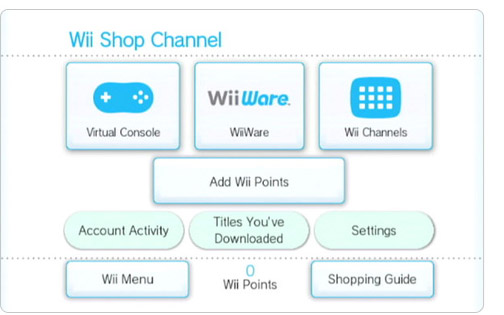
Nintendo uses different Shops for the Wii and DSi systems. They are respectively called Wii Shop and DSi shop. They are replaced with eShop for the 3DS and Wii U and I'll try to cover them as soon as possible. This will only focus on Wii and DSi. 

Nintendo All rights reseved

It offers plenty of content for both consoles. Distributed in a standard format, download the full game and play. If you own a Nintendo console, you know you don't have user profiles. It's a family console made for everyone to pick up and enjoy.

Nintendo All rights reservedNintendo All rights reserved


The Pros :

For the whole family :
You don't have to bother who bought what, once the content has been downloaded and installed, it becomes available to all. Since there are no profiles, it's kind of normal.

Market exclusives :
Nintendo took care of making sure that the content available on their shops is not the same content as in retail stores. It's either retro games from Nintendo and non Nintendo consoles, called the Virtual Console, or games developed specifically for the console called WiiWare/DSiWare.

The Cons :

Content is console-bound :
It is clear in Nintendo's End User License Agreement (EULA) that purchased content can only be used on the same console the transaction was made on. Too bad if you have multiple consoles, you cannot claim your games on both of them.
Money (or points), is also console-bound: if you bought or received a nice point cards and are planning on dividing it between two Wiis or even your Wii and DSi... you are also out of luck. Claiming your points can only be done on one market. So if you'd like to sell your digital content, you can't just sell your account, you'll have to sell your console and buy a new one.

Great risks in losing content :
Nintendo offered a tool to transfer your games from a DSi to a 3DS. I believe we will probably see a similar service for the Wii U. But let's say you lost your console or theft... you will have to buy it all over again. In fact, if you broke your console, Nintendo might be able to transfer content if you send both the old and new console, but there's no guarantee they'll be able to do it.  And if you just upgraded, let's say from a DSi to DSiXL, they won't help you out on that. The new eShop however (on the 3DS) will let you re-download content bound to your Nintendo user. But we will cover this later.

Conclusion :

While the current shop has some issues regarding multiple consoles and users altogether, Nintendo is patching this with their new eShop for the 3DS and Wii U. That will be covered in a few days.

Wednesday, September 26, 2012

Digital Distribution : And all that could have been. Onlive.


Starting today with the first article on my series on Digital Distribution, Onlive. Onlive is a streaming service. The way it works is that it streams the input from your device to their server and stream back the video to you. It is accessible from almost any devices : Low end PC/MAC, their console (and soon the Ouya), and mobile phones (iOS and Android). 


So far, it's one unique way of digitally distributing games. Just before the pros and cons, here is a diagram of how it works. Really simplified, but it'll help you understand a bit better how it is done.

Onlive technology, now also on iOS and Android

Pros:

Your games follow you
While its streaming technology makes the best part, your games follow you everywhere. No need to redownload it to a new device, you can play your games straight from your friend's PC, or even his phone.
Free trials : Try before you buy has never been so easy. Game trials are available for almost every games offered. It gives you 30 minutes of gameplay from the full game. You can replay the trial as much as you want, but each time you start from the beginning as it won't save your progress.

Game rentals
You are the kind of player who plays a game for a few days before moving on? There are two options for you. Rental of games cost less but you can play all you want for 3 to 5 days.

Netflix for games
Onlive offers a service called PlayPack. For 10$/month, you get unlimited access to around 150 games. From indies such as Doc Clock, old classics like Fallout 1 and 2, to blockbusters hit like Homefront Multiplayer and Just Cause 2. The only titles not there are new games who will eventually be added.

Price and promotions :
I got Deus Ex : HR for free (my brother gave me the code he got from buying the retail game), got Warhammer 40k : Space Marine for 1$, got Saint's Row: The 3rd for 20$ and usually new games are below the 40$ mark.  They used to give 5$ Fridays where great titles were 5$ (Red Faction Guerrilla and Armageddon, Dawn of War 2 and many more). Unfortunately, this golden time seems to be over today.

Cons :

Always on Internet
It's not some kind of security DRM, it's just the way they distribute the games.  No Internet? How could you stream the controls and the video?

Streaming is a lot of data
About 100MB/10 minutes, even for small indie games that usually are less than 100MB. This is the data rate monitored on a laptop but it does vary. It takes less on mobile due to the smaller screen, and more on the console since it streams on HD TVs. In many countries, this is not an issue as there is no bandwidth cap on home High Speed Internet, but in other regions, there is. And if you play a lot on your phone data plan, that could become expensive.

Games are account based
Sorry if you have a family, either everyone plays on the same account, sharing the achievements and other social features, or everyone buy their own games. Could get really expensive to have 4 PlayPack accounts.

Is it dying
Onlive might be a good example of the ugliness of digital distribution. For many, the recent bankrupt is the sign Onlive will die, even if a new owner is determined on keeping the service alive. If the distributor dies, so are your game database and every games you don't have installed. In the case of Onlive it could be worst since no games are installed at all.

Conclusion :

Onlive's business model of distribution was aimed at making its games accessible everywhere for a single user on many devices.  This, in theory is a great opportunity for gamers to always have their games with them, but in fact its weakness is that you are Internet-dependent.  The fact that every user needs to buy their own game is also a great drawback  compared to physical media.  The cheap prices, game rental, monthly service or free game trial having all that in an Instant Access is its strong point.

Monday, September 24, 2012

Digital Distribution : Welcome to the Jungle


Arguments on digital distribution are raining from every side. For or against, I want to offer a deep look into the subject. Since policies greatly vary from a platform to another, the bitter gamers tend to only focus on the bad of each ones. I'll be covering the way those policies can be viewed as an advantage or a hindrance depending on the platform.

They do share a common characteristic : You can't sell or lend your games to someone else unless you give them your full account and start a new one of your own.

In this series of articles, I'll be covering major digital distributors :

On PC/MAC :

Steam
Onlive
Humble Bundles

On consoles : 

PSN
Xbox Live
Nintendo Shops (Wii and DS)

On mobile :

Play Store (Android)
Windows Phone Market
App Store (iOS)
App World (BlackBerry)
Playstation Mobile (Coming Oct 3rd)

Feel free to give your bitter/sweet experience(s) with digital distribution and ask for other distributors to cover. Every platform will have its own post and will be coming on a regular basis for the next 2 or 3 weeks.